
Oscoda County Civil Docket Routes
Which court holds the record comes down to subject-matter jurisdiction.
Routing an Oscoda County civil docket search starts with the right court. Ordinary civil matters over $25,000, domestic relations, and other general-jurisdiction cases sit with the 23rd Circuit Court. Its Central Filing contact for circuit filings and records is 989-826-1111. The 81st District Court takes ordinary civil claims up to $25,000, plus small claims, civil infractions, and summary proceedings such as eviction matters. Some matters follow a separate path. Estates, trusts, guardianships, conservatorships, protective proceedings, and mental-commitment matters go through the Oscoda County Probate Court.
The dollar line routes a search. It predicts nothing about outcome. Small claims is a division of the 81st District Court, not a separate local court. Summary proceedings stay in that same lane. Before asking any clerk for a record, read the court printed on the summons, notice, or case history.
| Oscoda County court | Civil docket lane | Records contact |
|---|---|---|
| 23rd Circuit Court | Ordinary civil claims over $25,000 and domestic relations | Central Filing, 989-826-1111 |
| 81st District Court | Claims up to $25,000, small claims, and summary proceedings, including evictions | 989-826-1105 or 989-826-1106 |
| Oscoda County Probate Court | Estate and protective matters within probate jurisdiction | Probate Register, 989-826-1159 |
Administrative Order 2015-6 sets out the concurrent-jurisdiction plan covering the 23rd Circuit Court, the 81st District Court, and county probate courts. The order spells out how those courts share authority over cases.
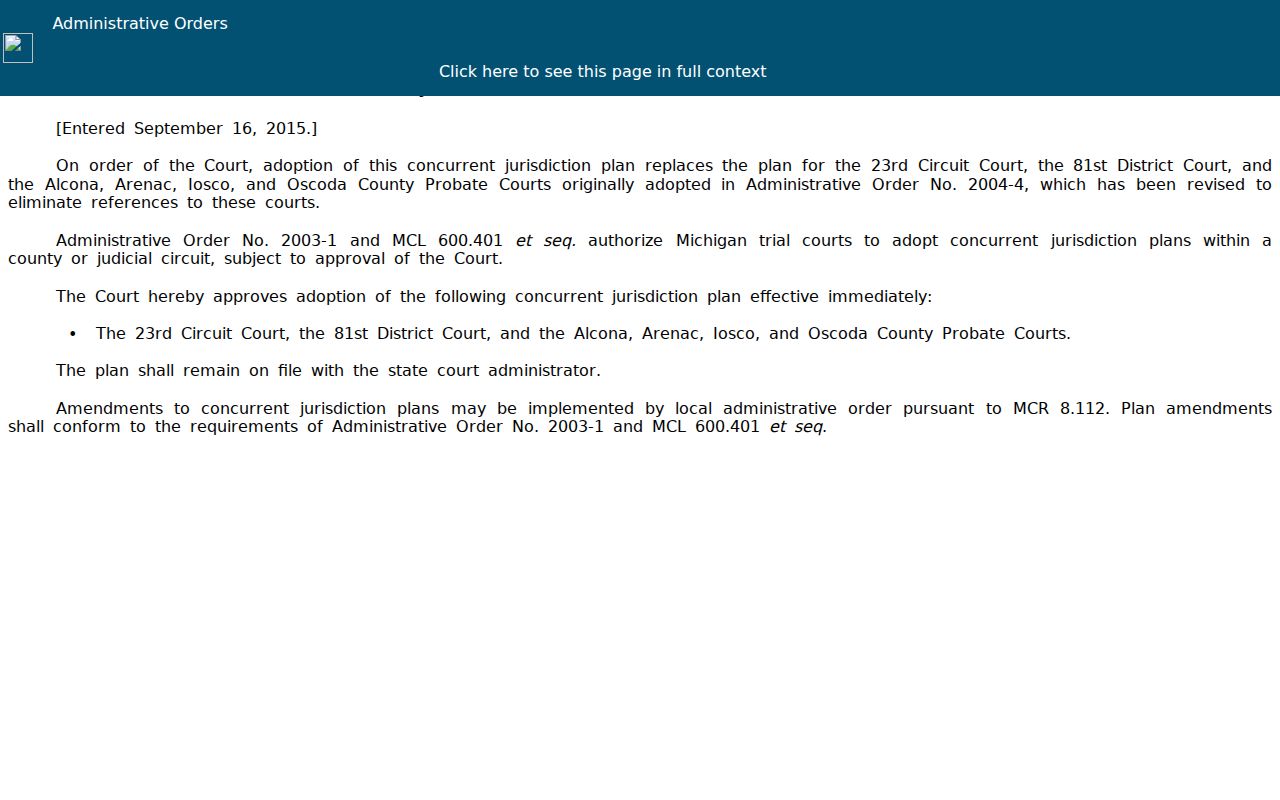
The order gives useful background on court structure. Still, the right Oscoda County civil docket turns on the claim type, the amount, and the court named on the case materials.
One caution before you search. The 23rd Judicial Circuit covers more than one county, so confirm the court location in MiCOURT rather than trusting the circuit name alone.
How to Search Civil Dockets
Start at MiCOURT Case Search, the public entry point for an Oscoda County civil docket. Accept the terms and pick the Oscoda location for the court you need. A case number from a notice is the cleanest route. Without one, type a last name or business. Then trim the results with a first or middle name and the court location. The 23rd Circuit serves Alcona, Arenac, Iosco, and Oscoda counties. A familiar court name is not enough on its own.
Treat the case history as informational, not the official record. It still confirms plenty. You get the case number, case type, filing date, status, parties, the next event, and dated register of actions entries. A missing document image does not mean the filing never happened. It means the Oscoda County civil docket office may have to hand you the filed document itself.
- Select the Oscoda County Circuit, District, or Probate location that matches the civil matter.
- Use Year, Number, and Type from a notice when a case number is known, or begin with the party or business name.
- Match the court, year, type, filing date, and parties before opening the civil case details.
- Read the register in date order, including service, answer, motion, order, hearing, and disposition entries.
- Request the register, pleading, judgment, or certified copy from the office that holds the Oscoda County civil file when wording matters.
Oscoda County Civil Docket Search Fields
MiCOURT splits its public search into two paths. A name search needs a last name or business field to begin. A case-number search, by contrast, is built from Year, Number, and Type. For the local type value, rely on the court notice or the returned case. The state documentation warns: type values differ by court.
Filters earn their keep after a broad Oscoda County civil docket search. The public screen shows fewer controls than the state API documentation describes. Even so, the documented categories include civil, domestic, and probate, plus status and date ranges for filing or disposition. One privacy habit is worth keeping. Skip full dates of birth as a search aid.
| Field | Use in an Oscoda County civil search | Careful reading point |
|---|---|---|
| Court location | Select 23rd Circuit, 81st District, or Probate if available | Confirm the Oscoda location for a multi-county court |
| Last name or business | Required beginning field for a name search | Use first and middle name only to narrow a match |
| Year, Number, Type | Use the format on the notice for a case search | Do not guess a local type code |
| Status and dates | Limit an established result set | Closed or disposed needs a later disposition entry |
What a Civil Docket Shows
An Oscoda County civil docket packs a lot into one record. Expect the case number, case type, status, file date, assigned judge, caption, and disposition. The parties area goes further. It lists each party's role, attorney, alternate names, answer date, service date, and any party actions. The register of actions forms the spine. It moves through the life of the case in order. A complaint or petition opens it. From there you may see a summons, a service entry, an answer, a notice of hearing, motions, orders, a settlement, a default, a dismissal, a judgment, and later enforcement activity.
Sample records from the state add event, financial or receipt, and disposition areas. A real public civil docket often shows only part of that inventory. One caution. The online field for amount owed or amount due is not proof a judgment was satisfied. For that answer, look for a receipt or satisfaction entry instead. It tells you far more.
| Header | Case number, type, status, file date, judge, caption, and disposition fields when published. |
|---|---|
| Parties | Plaintiff or petitioner, defendant or respondent, attorney, party role, and available answer or service dates. |
| Docket register | Dated filing and event descriptions, docket text, reference information, and possible amount-due fields. |
| Events | Next event, hearing date, time, judge, and location where the court publishes them. |
| Disposition | Dismissal, default, settlement, judgment, transfer, or another recorded outcome, with its date. |
Oscoda County Civil Docket Party Blocks
Before you lean on a single Oscoda County civil docket entry, read the parties block first. It tells you who brought the case and who must respond. It can also name counsel and date each party's actions. Keep expectations in check, though. An answer filed by one party does not resolve a claim. And a service date matters more than people assume. It shows something beyond the date a summons was created.
Sequence is everything here. A complaint or petition starts the matter. A summons filed only records an issuance or filing event, not completed service. Proof of service, an answer, and later party action entries fill in what a summons alone cannot. The same care extends to documents. A docket description can identify a filing even when no public image is attached.
- Plaintiff or petitioner
- The party starting a civil action or asking the court to issue an order.
- Defendant or respondent
- The party answering a claim or petition.
- Service
- Formal delivery of case papers. A summons entry alone does not establish that this step was completed.
- Party action
- A dated event associated with a party, such as an answer filed or an action due.
Types of Civil Cases on the Docket
Match your Oscoda County civil docket search to the right court. Circuit Court handles ordinary civil claims above the district limit. It also takes domestic-relations matters. The 81st District Court takes claims at or below that limit. It also handles small claims and summary proceedings. Probate runs on its own track. Those records look civil but follow separate case types and access rules.
Trust the title on a MiCOURT result over a name match. A shared surname cannot turn an estate into a small claim. It cannot turn a family matter into ordinary civil either. The category filter helps. Yet the court, case type, and dated record still identify the file best.
- Ordinary civil claims over $25,000 in the 23rd Circuit Court
- Ordinary civil claims up to $25,000 in the 81st District Court
- Small claims as an 81st District Court division
- Summary proceedings and other district civil matters
- Domestic relations, estate, guardianship, and protective matters in their proper court lanes
Oscoda County Civil Docket Dispositions
Read disposition labels plainly on an Oscoda County civil docket. Uncontested, default, and settled mark three different routes lumped into one state statistical bucket. Dismissed by party means the side that filed chose to walk away. Dismissed by court means the judge ended it. Inactive status just moves the case there; it is not a merits judgment.
A judgment remains the court's operative decision. A default judgment is different. It follows a permitted failure to answer or appear. If a case transfers or changes type, trace the linked entries and the court location. When legal effect matters, order the signed judgment or dismissal order. The Oscoda County office holding the case supplies it.
Oscoda County Civil Docket Motions
Motions and orders are distinct entries on an Oscoda County civil docket. A motion asks. An order rules. Check both. Check the date on any hearing notice too, before concluding what changed. A setting only tells you when an issue is scheduled. A later register entry reveals whether it was held, continued, or decided.
Read the later entry. A filed motion is not a ruling, and a scheduled hearing is not proof that the hearing occurred or that relief was granted.
When exact wording drives your next move, order the signed order or filed motion. Get it from Central Filing or the District Court. The public history helps you name the document and its date. It does not promise a full image of the filing.
Note: Give staff the case number and date range. Ask them to locate a particular motion or order.
Settings and Hearings on Civil Dockets
A civil setting may surface in the case details. It may also sit inside the dated Oscoda County civil docket text. Where the court publishes it, scan for event type, date, time, judge, and room or location. Note any later result. A notice of hearing or a case-level next event flags what is coming. Read it beside the newest docket entry and any signed order.
Never lean on a stale setting after a continuance, reset, waiver, cancellation, or result appears. Need a comparison? See the Oscoda County court calendar reference for case history, public display, and clerk confirmation side by side.
Oscoda County Civil Docket After Judgment
A closed label does not finish every Oscoda County civil docket entry. Post-judgment activity can follow: an amended judgment, satisfaction, abstract of judgment, garnishment, writ, execution, payment, or appeal. These change the practical story of the case. The original filing date and caption stay fixed.
Start with the dated disposition and judgment entries. Then read what came after. A financial tab alone is not a satisfaction certificate. When legal effect counts, ask the court office for the signed judgment or satisfaction instead of trusting a status label.
Public Access to Civil Dockets
Michigan public-access rules let anyone inspect and copy a public case record unless a statute, court rule, or court order restricts it. MCR 8.119 adds a limit. A court may charge reproduction costs but nothing merely to view public case history. MiCOURT stays informational, not official.
Some matters and identifiers stay sealed. MCR 1.109 shields dates of birth, Social Security numbers, license or passport numbers, and financial-account numbers. An empty result may reflect restriction, redaction, the wrong court, or an older record. It never proves no case exists.
Public-record limit: MCR 8.119 generally permits inspection of public court records, while MCR 1.109 requires protection of specified personal information.
Oscoda County Civil Docket Family Records
Domestic-relations cases sit in the Circuit Court family lane. Support or scheduling questions may still belong elsewhere. Family Division scheduling: 989-826-1166. The Friend of the Court runs its own support and enforcement functions. Its financial-information channel is no public stand-in for the underlying Oscoda County civil docket.
Family results can carry limits an ordinary civil search does not. Sort out the court, case type, and public portion of the record. Do this before requesting copies. For current scheduling and access instructions, contact the office named on the case or notice.
Oscoda County Civil Docket Copy Path
Start with the online case history, then pick the copy route that fits the file. Central Filing and the District Court counter both offer inspection and official copies. Call first. A document may be public, stored on site, or need retrieval. Probate matters belong with the Probate Register instead.
Need something older, like a pleading, order, or register? The Oscoda County Trial Courts NextRequest portal takes targeted court-record requests. Treat it as a request channel, though. It is not a live docket database. Each request should name the court, case number, party names, date range, and the exact item you want. County policy allows a five-business-day response or deposit step, plus a possible ten-business-day extension. Mailing a request or bringing one in? Confirm the right P.O. Box and payment method by phone. The court FAQ accepts cash, money orders, and certified checks, but not personal checks.
23rd Circuit Court Central Filing
Circuit civil and domestic-relations records
989-826-1111
81st District Court
District civil, small claims, and summary-proceeding records
989-826-1105 or 989-826-1106
Oscoda County Probate Register
Probate filing, schedules, and probate record questions
989-826-1159
Note: The local FAQ lists $1 per page for a register of actions or plain filed document, $10 for a created civil record search, and $10 plus $1 per page for a certified filed document.